
# 6.MyBatis-自定义映射
数据准备
数据库
create table t_dept(
    did int primary key auto_increment comment '主键',
    dept_name varchar(20)
);

create table t_emp(
    eid int primary key auto_increment comment 'id',
    emp_name varchar(20) comment '员工名',
    age int comment '年龄',
    sex char comment '性别',
    email varchar(20) comment '邮箱',
    did int
)
2
3
4
5
6
7
8
9
10
11
12
13
插入数据
INSERT INTO test.t_dept (did, dept_name) VALUES (1, 'A');
INSERT INTO test.t_dept (did, dept_name) VALUES (2, 'B');
INSERT INTO test.t_dept (did, dept_name) VALUES (3, 'C');

INSERT INTO test.t_emp (emp_name, age, sex, email, did) VALUES ('张三', 14, '男', '123@qq.com', 1);
INSERT INTO test.t_emp (emp_name, age, sex, email, did) VALUES ('李四', 16, '男', '123@qq.com', 2);
INSERT INTO test.t_emp (emp_name, age, sex, email, did) VALUES ('王五', 56, '女', '123@qq.com', 3);
INSERT INTO test.t_emp (emp_name, age, sex, email, did) VALUES ('赵六', 46, '女', '123@qq.com', 2);
INSERT INTO test.t_emp (emp_name, age, sex, email, did) VALUES ('田七', 37, '男', '123@qq.com', 1);
2
3
4
5
6
7
8
9
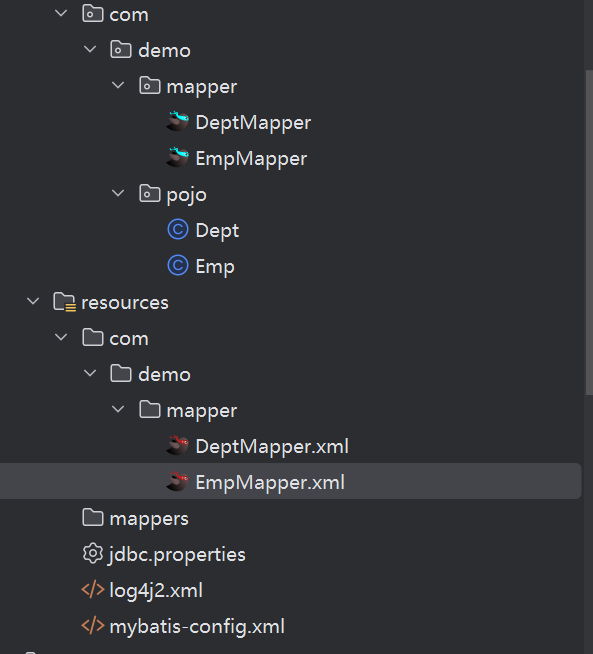
搭建框架
mapper,映射文件,配置文件,pojo实体
# 1.解决字段名与属性名不匹配
Emp实体
    private Integer eid;
    private String empName;
    private Integer age;
    private String sex;
    private String email;
2
3
4
5
属性名为empName,而数据库的字段名为emp_Name
解决方案一:不使用*查询具体字段并起别名来代替
接口方法
List<Emp> getAllEmp();
xml
    <select id="get_tAllEmp" resultType="com.demo.pojo.Emp">
<!--        select * from t_emp   -->
        select eid,emp_name empName,age,sex,email from t_emp
    </select>
2
3
4
解决方案二:全局配置
在配置文件中设置,下划线转驼峰
    <settings>
        <setting name="mapUnderscoreToCamelCase" value="true"/>
    </settings>
2
3
这样就可以用*了
    <select id="getAllEmp" resultType="com.demo.pojo.Emp">
        select * from t_emp
    </select>
2
3
解决方案三:自定义Map,手动映射
    <resultMap id="empResultMap" type="Emp">
        <id property="eid" column="eid"/>
        <result property="empName" column="emp_name"/>
        <result property="age" column="age"/>
        <result property="sex" column="sex"/>
        <result property="email" column="email"/>
    </resultMap>

    <select id="getAllEmp" resultMap="empResultMap">
        select * from t_emp
    </select>
2
3
4
5
6
7
8
9
10
11
<resultMap>是 MyBatis 结果映射的核心,id用于引用,type指定映射的实体类;<id>映射主键列(优化性能),<result>映射普通列;property对应实体属性名,column对应数据库列名,两者是映射的核心关联关系。
# 2.处理多对1映射关系
在emp中添加dept属性,get,set,重写toString
private Dept dept;
1.级联赋值
接口方法:
Emp getEmpAndDept(@Param("eid") Integer eid);
xml
    <resultMap id="empAndDeptResult" type="Emp">
        <id property="eid" column="eid"/>
        <result property="empName" column="emp_name"/>
        <result property="age" column="age"/>
        <result property="sex" column="sex"/>
        <result property="email" column="email"/>
        <result property="dept.did" column="did"/>
        <result property="dept.deptName" column="dept_name"/>
    </resultMap>

    <select id="getEmpAndDept" resultMap="empAndDeptResult">
        select * from t_emp e left join t_dept d on e.did=d.did where e.eid=#{eid}
    </select>
2
3
4
5
6
7
8
9
10
11
12
13
2.association标签处理多对一映射关系
property:需要处理多对映射关系的属性名
javaType:该属性的类型
    <resultMap id="empAndDeptResult" type="Emp">
        <id property="eid" column="eid"/>
        <result property="empName" column="emp_name"/>
        <result property="age" column="age"/>
        <result property="sex" column="sex"/>
        <result property="email" column="email"/>
        <association property="dept" javaType="Dept">
            <id property="did" column="did"/>
            <result property="deptName" column="dept_name"/>
        </association>
    </resultMap>
2
3
4
5
6
7
8
9
10
11
3.分步查询
先查询t_emp表中的did,再根据did查询部门信息
步骤一:定义接口方法
Emp getEmpAndDeptByStepOne(@Param("eid") Integer eid);
步骤二:编写基础配置文件
<resultMap id="empAndDeptResultByStep" type="Emp">
        <id property="eid" column="eid"/>
        <result property="empName" column="emp_name"/>
        <result property="age" column="age"/>
        <result property="sex" column="sex"/>
        <result property="email" column="email"/>
    </resultMap>

    <select id="getEmpAndDeptByStepOne" resultMap="empAndDeptResultByStep">
        select * from t_emp where eid=#{eid}
    </select>
2
3
4
5
6
7
8
9
10
11
步骤三:查询部门信息
DeptMapper接口方法:
Dept getEmpAndDeptByStepTwo(@Param("did") Integer did);
编写配置文件
    <select id="getEmpAndDeptByStepTwo" resultType="com.demo.pojo.Dept">
        select * from t_dept where did=#{did}
    </select>
2
3
步骤四:完善Map映射
association下的属性值:
select:设置分步查询sql的唯一标识(类的全类名+方法名)
column:分步查询的条件
    <resultMap id="empAndDeptResultByStep" type="Emp">
        <id property="eid" column="eid"/>
        <result property="empName" column="emp_name"/>
        <result property="age" column="age"/>
        <result property="sex" column="sex"/>
        <result property="email" column="email"/>
        <association property="dept"
                     select="com.demo.mapper.DeptMapper.getEmpAndDeptByStepTwo"
                     column="did"/>
    </resultMap>
2
3
4
5
6
7
8
9
10
4.分步查询与延迟加载核心配置
1)全局配置(核心配置文件 mybatis-config.xml)
| 配置项 | 作用说明 |
|---|---|
lazyLoadingEnabled | 延迟加载的全局开关。开启后,所有关联对象默认采用延迟加载策略。 |
aggressiveLazyLoading | 控制延迟加载的粒度: - 开启:调用对象的任意方法,都会加载该对象的所有属性。 - 关闭:每个属性按需加载,只有访问该属性时才会触发 SQL。 |
2)局部配置(Mapper XML 中)
在 <association>(一对一)和 <collection>(一对多)标签中,可通过 fetchType 属性覆盖全局配置,实现精细化控制:
fetchType="lazy":当前关联对象使用延迟加载。fetchType="eager":当前关联对象使用立即加载。
3)核心优势
- 按需加载:只执行获取当前数据所需的 SQL,避免一次性加载大量关联数据,提升性能。
- 灵活控制:全局开关统一策略,局部配置灵活调整,兼顾开发效率与性能优化。
测试用例
    @Test
    public void test3()  {
        EmpMapper mapper = SessionUtil.getSession().getMapper(EmpMapper.class);
        Emp emp = mapper.getEmpAndDeptByStepOne(1);
        System.out.println(emp.getEmpName());
2
3
4
5
配置文件
<settings>
        <setting name="mapUnderscoreToCamelCase" value="true"/>
        <setting name="lazyLoadingEnabled" value="true"/>
    </settings>
2
3
4
如果只写这个结果为:
18:24:45.228 [main] DEBUG com.demo.mapper.EmpMapper.getEmpAndDeptByStepOne - ==> Preparing: select * from t_emp where eid=? 18:24:45.250 [main] DEBUG com.demo.mapper.EmpMapper.getEmpAndDeptByStepOne - ==> Parameters: 1(Integer) 18:24:45.299 [main] DEBUG com.demo.mapper.EmpMapper.getEmpAndDeptByStepOne - <== Total: 1 张三
加上fetchType
<resultMap id="empAndDeptResultByStep" type="Emp">
        <id property="eid" column="eid"/>
        <result property="empName" column="emp_name"/>
        <result property="age" column="age"/>
        <result property="sex" column="sex"/>
        <result property="email" column="email"/>
        <association property="dept"
                     select="com.demo.mapper.DeptMapper.getEmpAndDeptByStepTwo"
                     column="did"
                    fetchType="eager"
            />
    </resultMap>
2
3
4
5
6
7
8
9
10
11
12
18:21:45.784 [main] DEBUG com.demo.mapper.EmpMapper.getEmpAndDeptByStepOne - ==> Preparing: select * from t_emp where eid=? 18:21:45.812 [main] DEBUG com.demo.mapper.EmpMapper.getEmpAndDeptByStepOne - ==> Parameters: 1(Integer) 18:21:45.828 [main] DEBUG com.demo.mapper.DeptMapper.getEmpAndDeptByStepTwo - ====> Preparing: select * from t_dept where did=? 18:21:45.829 [main] DEBUG com.demo.mapper.DeptMapper.getEmpAndDeptByStepTwo - ====> Parameters: 1(Integer) 18:21:45.831 [main] DEBUG com.demo.mapper.DeptMapper.getEmpAndDeptByStepTwo - <==== Total: 1 18:21:45.832 [main] DEBUG com.demo.mapper.EmpMapper.getEmpAndDeptByStepOne - <== Total: 1 张三
# 3.处理1对多的映射关系
1.collection
1)在Dept实体类中加入emps属性,重写toString
private List<Emp> emps;
2)在DeptMapper接口中定义方法
Dept getDeptAndEmp(@Param("did") Integer did);
3)编写映射文件
collection处理一对多集合映射关系
ofType:表示该属性的集合中存储的数据类型
    <resultMap id="deptAndEmpResult" type="Dept">
        <id property="did" column="did"/>
        <result property="deptName" column="dept_name"/>
        <collection property="emps" ofType="Emp">
            <id property="eid" column="eid"/>
            <result property="empName" column="emp_name"/>
            <result property="age" column="age"/>
            <result property="sex" column="sex"/>
            <result property="email" column="email"/>
        </collection>
    </resultMap>
    <select id="getDeptAndEmp" resultMap="deptAndEmpResult">
        select * from t_dept d left join t_emp e on d.did=e.did where d.did=#{did}
    </select>
2
3
4
5
6
7
8
9
10
11
12
13
14
2.分步处理
第一步
接口方法:
Dept getDeptAndEmpByStepOne(@Param("did") Integer did);
xml
<resultMap id="deptAndEmpResultByStep" type="Dept">
        <id property="did" column="did"/>
        <result property="deptName" column="dept_name"/>
        <collection property="emps"
                    select=""
                    column="did"/>
    </resultMap>
    <select id="getDeptAndEmpByStepOne" resultMap="deptAndEmpResultByStep">
        select * from t_dept where did=#{did}
    </select>
2
3
4
5
6
7
8
9
10
第二步
接口方法:
Emp getDeptAndEmpByStepTwo(@Param("did") Integer did);
xml
    <select id="getDeptAndEmpByStepTwo" resultType="com.demo.pojo.Emp">
        select * from t_emp where did=#{did}
    </select>
2
3
完善第一步的xml
<resultMap id="deptAndEmpResultByStep" type="Dept">
        <id property="did" column="did"/>
        <result property="deptName" column="dept_name"/>
        <collection property="emps"
                    select="com.demo.mapper.EmpMapper.getDeptAndEmpByStepTwo"
                    column="did"/>
    </resultMap>
    <select id="getDeptAndEmpByStepOne" resultMap="deptAndEmpResultByStep">
        select * from t_dept where did=#{did}
    </select>
2
3
4
5
6
7
8
9
10