
# Java8新特性
# Lambda表达式
# 基本用法
lambda表达式允许将代码块作为方法参数,简化匿名内部类的核心
//函数式接口(接口中只有一个方法)
@FunctionalInterface
interface Swim{
    void swimming();
}


Swim s=new Swim() {
    @Override
    public void swimming() {
        System.out.println("原方法");
        }
    };

//等同于
Swim s1=()->{
    System.out.println("lambda简化方法");
};
//可再次化简
2
3
4
5
6
7
8
9
10
11
12
13
14
15
16
17
18
19
lambda表达式的化简示例
// 传统遍历方式
for (String name : names) {
    System.out.println(name);
}

// Lambda 表达式方式
names.forEach(name -> System.out.println(name));

// 方法引用方式(更简洁)
names.forEach(System.out::println);
2
3
4
5
6
7
8
9
10
# 函数式接口
# 基本用法
函数式接口是只有一个抽象方法的接口,是lambda表达式的本质
//只有一个抽象方法的接口,可以使用 @FunctionalInterface 注解标注。
@FunctionalInterface
interface MathOperation{
   // 只能有一个抽象方法
    int operate(int a, int b);

    // 可以有默认方法
    default void printResult(int result) {
        System.out.println("结果: " + result);
    }

    // 可以有静态方法
    static MathOperation getDefault() {
        return (a, b) -> a + b;
        //也可化简为 return Integer::sum;
    }
}
2
3
4
5
6
7
8
9
10
11
12
13
14
15
16
17
# 常用的函数式接口
常用的函数式接口主要有断言型接口,函数型接口(个人用的最多),消费型接口,供给型接口
后面的一元二元操作了解即可
public class FunctionalInterfacesExample {
    public static void main(String[] args) {
        // 1. Predicate<T> - 断言型接口
        Predicate<String> predicate = s -> s.length() > 3;
        System.out.println(predicate.test("Java")); // true

        // 2. Function<T, R> - 函数型接口
        Function<String, Integer> function = String::length;
        System.out.println(function.apply("Hello")); // 5

        // 3. Consumer<T> - 消费型接口
        Consumer<String> consumer = System.out::println;
        consumer.accept("Hello Consumer");

        // 4. Supplier<T> - 供给型接口
        Supplier<Double> supplier = Math::random;
        System.out.println(supplier.get());

        // 5. UnaryOperator<T> - 一元操作符
        UnaryOperator<String> unaryOperator = s -> s.toUpperCase();
        System.out.println(unaryOperator.apply("hello"));

        // 6. BinaryOperator<T> - 二元操作符
        BinaryOperator<Integer> binaryOperator = Integer::sum;
        System.out.println(binaryOperator.apply(10, 20)); // 30
    }
}
2
3
4
5
6
7
8
9
10
11
12
13
14
15
16
17
18
19
20
21
22
23
24
25
26
27
# Stream Api
# 基本用法
stream流是java8的一个非常重要的特性,利用它我们可以更优雅的(graceful)处理集合
示例如下
public static void main(String[] args) {
    //传统方式处理集合
    List<String> fruits=List.of("apple","banana","orange");
    List<String> upperCaseFruits=new ArrayList<>();
    for (String fruit : fruits) {
        if (fruit.length()>5){
            fruit.toUpperCase();
            upperCaseFruits.add(fruit.toUpperCase());
        }
    }
    Collections.sort(upperCaseFruits);
    System.out.println(upperCaseFruits);
    //使用stream流
    fruits.stream()
            .filter(fruit -> fruit.length()>5)
            .map(String::toUpperCase)
            .sorted()
            .collect(Collectors.toList());
    System.out.println(upperCaseFruits);
}
2
3
4
5
6
7
8
9
10
11
12
13
14
15
16
17
18
19
20
stream流像一个流水线一样,把这些操作串行执行,更清晰更流畅(不过好多人都说代码可读性降低了,不过自己编程用起来更加方便)
# stream的操作类型
stream流包括中间操作和终端操作,中间操作是懒惰的,只有遇到终端操作时这些代码才会真正的执行,案例如下
public class Student {
    private String name;
    private int score;
    private String major;

    // 构造方法、getter、setter省略
}
List<Student> students = Arrays.asList(
        new Student("Alice", 85, "CS"),
        new Student("Bob", 75, "Math"),
        new Student("Charlie", 90, "CS"),
        new Student("David", 65, "Math"),
        new Student("Eve", 95, "CS")
);

// 1. 过滤和映射
List<String> csStudents = students.stream()
        .filter(s -> "CS".equals(s.getMajor()))
        .map(Student::getName)


List<String> csStudents = students.stream()
            .filter(s -> "CS".equals(s.getMajor()))
            .map(Student::getName)
            .collect(Collectors.toList());
2
3
4
5
6
7
8
9
10
11
12
13
14
15
16
17
18
19
20
21
22
23
24
25
26
上例中的filter和map就属于中间操作,除了这两个还有
sorted()-排序
limit()-限制数量
distinct()-去重
collect就属于终端操作,可收集为各类集合
下面是一些常见的用例大家可以参考一下
public class StreamOperations {
    public static void main(String[] args) {
        List<Student> students = Arrays.asList(
            new Student("Alice", 85, "CS"),
            new Student("Bob", 75, "Math"),
            new Student("Charlie", 90, "CS"),
            new Student("David", 65, "Math"),
            new Student("Eve", 95, "CS")
        );

        // 1. 过滤和映射
        List<String> csStudents = students.stream()
            .filter(s -> "CS".equals(s.getMajor()))
            .map(Student::getName)
            .collect(Collectors.toList());

        // 2. 排序
        List<Student> sortedByScore = students.stream()
            .sorted(Comparator.comparing(Student::getScore).reversed())
            .collect(Collectors.toList());

        // 3. 去重
        List<Integer> numbers = Arrays.asList(1, 2, 2, 3, 3, 3);
        List<Integer> distinctNumbers = numbers.stream()
            .distinct()
            .collect(Collectors.toList());

        // 4. 限制和跳过
        List<Student> top3 = students.stream()
            .sorted(Comparator.comparing(Student::getScore).reversed())
            .limit(3)
            .collect(Collectors.toList());

        // 5. 分组
        Map<String, List<Student>> byMajor = students.stream()
            .collect(Collectors.groupingBy(Student::getMajor));

        // 6. 连接字符串
        String allNames = students.stream()
            .map(Student::getName)
            .collect(Collectors.joining(", "));
    }
}

class Student {
    private String name;
    private int score;
    private String major;

    // 构造方法、getter、setter 省略
}
2
3
4
5
6
7
8
9
10
11
12
13
14
15
16
17
18
19
20
21
22
23
24
25
26
27
28
29
30
31
32
33
34
35
36
37
38
39
40
41
42
43
44
45
46
47
48
49
50
51
# 并行流
并行流是 Java 8 Stream API 的核心特性之一,它能自动将数据拆分成多个子任务,利用多核 CPU 并行处理,从而大幅提升大数据量下的处理效率。
1.并行流底层基于 Fork/Join 框架实现任务拆分与合并
2.它会将数据源(如集合)拆分成多个子块,每个子块由不同线程并行处理
3.终将各子块的处理结果合并为最终输出
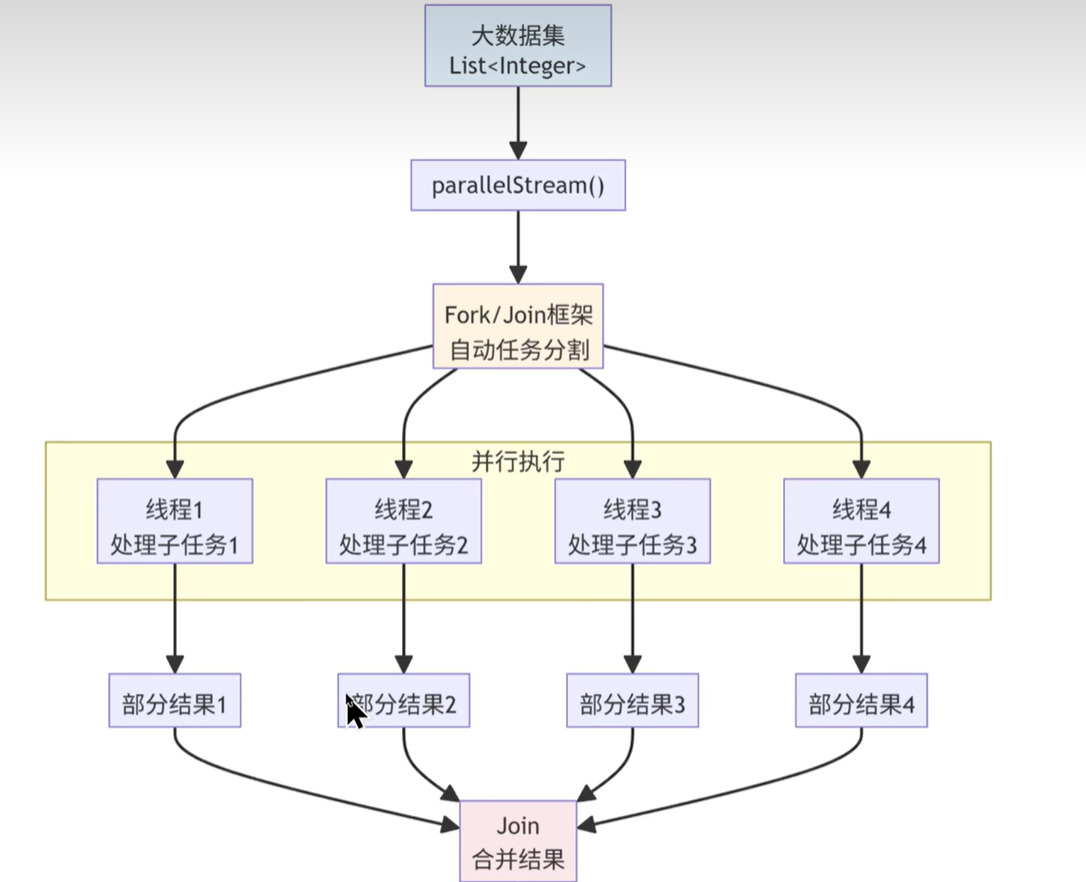
当然并行流也会有一些局限性,他使用 ForkJoinPool.commonPool(),该线程池是全局共享的,也就是说当有线程在某一步运算阻塞时不被释放时,就会影响其他也用了这个公共线程池的性能,所以他比较适合一些小数据的运算,不适合io操作频繁的任务
大家可以运行一下下面的代码来体会一下速度差距和并行流的用法(其实就是将stream换成parallelStream)大概的差距是2-4倍
public class ParallelStreamPerformance {
    public static void main(String[] args) {
        // 准备100万条测试数据
        List<Integer> data = new ArrayList<>();
        for (int i = 0; i < 1000000; i++) {
            data.add(i);
        }

        // 串行流测试
        long start = System.currentTimeMillis();
        data.stream()
            .filter(n -> n % 2 == 0)
            .count();
        long serialTime = System.currentTimeMillis() - start;
        System.out.println("串行流耗时:" + serialTime + "ms");

        // 并行流测试
        start = System.currentTimeMillis();
        data.parallelStream()
            .filter(n -> n % 2 == 0)
            .count();
        long parallelTime = System.currentTimeMillis() - start;
        System.out.println("并行流耗时:" + parallelTime + "ms");
    }
}
2
3
4
5
6
7
8
9
10
11
12
13
14
15
16
17
18
19
20
21
22
23
24
25
# Optional
# 基本用法
Optional 类用于优雅处理 null 值,避免空指针异常(NullPointerException),提供一系列方法安全操作空值。
public class OptionalDemo {
    public static void main(String[] args) {
        // 1. 创建 Optional 对象
        Optional<List<String>> optional = Optional.of(List.of("apple", "banana", "orange"));
        Optional<String> optional1 = Optional.of("Hello Java 8"); // 非空值
        Optional<String> optional2 = Optional.empty(); // 空值
        Optional<String> optional3 = Optional.ofNullable(null); // 允许null的创建方式

        // 2. 安全取值(避免NPE)
        // ifPresent:值存在时执行操作
        optional1.ifPresent(s -> System.out.println("值存在:" + s)); // 输出:值存在:Hello Java 8
        optional2.ifPresent(System.out::println); // 无输出

        // 3. 取值/兜底
        String value1 = optional3.orElse("默认值"); // 空值时返回默认值
        System.out.println(value1); // 输出:默认值

        // 4. 空值时抛出异常
        //optional3.orElseThrow(() -> new RuntimeException("值为空"));

        //5.optional的过滤映射操作
        optional.map(list -> list.stream()
                        .filter(s -> s.startsWith("a"))
                        .map(String::toUpperCase)         // 转换为大写
                        .collect(Collectors.toList()))
                .ifPresentOrElse(System.out::println, () -> System.out.println("没有匹配的元素"));

    }
}
2
3
4
5
6
7
8
9
10
11
12
13
14
15
16
17
18
19
20
21
22
23
24
25
26
27
28
29
# 新的时间日期Api
# 基本用法
日期对于上面的来说就比较简单了,主要有下面用法,随时用随时查也是ok的
public class DateTimeExample {
    public static void main(String[] args) {
        // 1. LocalDate - 日期
        LocalDate date = LocalDate.now();//当前日期
        LocalDate specificDate = LocalDate.of(2026, 1, 1);//特定日期
        LocalDate parsedDate = LocalDate.parse("2024-01-01");//解析日期字符串

        // 2. LocalTime - 时间
        LocalTime time = LocalTime.now();//当前时间
        LocalTime specificTime = LocalTime.of(14, 30, 0);//特定时间

        // 3. LocalDateTime - 日期时间
        LocalDateTime dateTime = LocalDateTime.now();//当前日期时间
        LocalDateTime specificDateTime = LocalDateTime.of(2026, 1, 1, 14, 30);//特定日期时间

        // 4. ZonedDateTime - 带时区的日期时间
        ZonedDateTime zonedDateTime = ZonedDateTime.now();//2026-01-28T21:27:52.666687900+08:00[Asia/Shanghai]
        ZonedDateTime tokyoTime = ZonedDateTime.now(ZoneId.of("Asia/Tokyo"));//2026-01-28T22:27:52.666687900+09:00[Asia/Tokyo]

        // 5. Duration - 时间间隔(基于时间)
        Duration duration = Duration.between(
            LocalTime.of(14, 0),
            LocalTime.of(16, 30)
        );//PT2H30M PT表示Period Time 间隔2小时30分钟


        // 6. Period - 时间段(基于日期)
        Period period = Period.between(
            LocalDate.of(2023, 1, 1),
            LocalDate.of(2024, 1, 1)
        );//P1Y P表示间隔

        // 操作示例
        LocalDate tomorrow = date.plusDays(1);
        LocalDate lastMonth = date.minusMonths(1);
        boolean isLeapYear = date.isLeapYear();//是否闰年

        // 格式化
        DateTimeFormatter formatter = DateTimeFormatter.ofPattern("yyyy-MM-dd HH:mm:ss");
        String formatted = dateTime.format(formatter);
        LocalDateTime parsed = LocalDateTime.parse("2026-01-01 14:30:00", formatter);

        // 时间计算
        long daysBetween = ChronoUnit.DAYS.between(
            LocalDate.of(2023, 1, 1),
            LocalDate.of(2024, 1, 1)
        );//间隔天数
    }
}
2
3
4
5
6
7
8
9
10
11
12
13
14
15
16
17
18
19
20
21
22
23
24
25
26
27
28
29
30
31
32
33
34
35
36
37
38
39
40
41
42
43
44
45
46
47
48
49
# 接口的默认方法(必备)
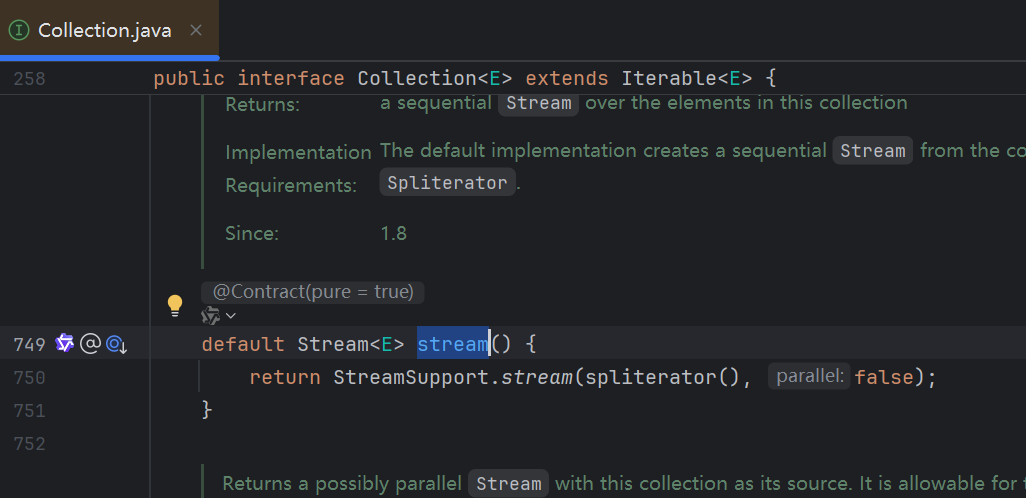
大家想一想当你有一个10个 方法的接口,很多类实现了这个接口,你想新增一个方法但是不想全部重写怎么办?这时候接口的默认方法就能实现这个功能。下面是一个官方的例子给大家体会一下
← Java新特性 笔记 java9新特性 →